Writing · · 12 min read
Manuscript Formatting: The Standard Novel Format
A novel manuscript is a plain, readable working document: 12-point Times New Roman or similar, double-spaced, one-inch margins, a title page, a running header with your surname, short title and page number, and each chapter starting on a new page. Agents and editors read it to judge your writing, then pass the text on for copyediting and design. Keep it simple, follow any submission instructions you are given over any general rule, and keep your story details consistent so the file you send has no loose ends. If you draft in a workspace that keeps your manuscript beside your world notes, such as Sagalith, exporting is always free, so the file is yours to format and send.
TL;DR
-
Standard novel format: 12-point standard font, double spacing, 1-inch margins, left-aligned text, no extra space between paragraphs, a title page, and a header with surname, short title and page number.
-
A manuscript is not a designed book page. Do not justify text, add decorative fonts or lay out the pages like a printed novel.
-
Agent and publisher guidelines override every general rule. Some ask for 1.5 spacing, a specific file type or no identifying details.
-
Before sending, clean the file: accept or reject tracked changes, remove comments, name it clearly and reopen the exact file you plan to send.
-
Consistency matters as much as layout. Names, timelines and chapter order should match from page one to the end.
Table of Contents
What a manuscript is, and what it is not
A manuscript is the file you hand to someone who will read it, edit it or consider representing it. It is not the finished book. According to Carol Saller at CMOS Shop Talk, a printed book page is typeset with single-spaced, justified text and design choices, while a manuscript stays plain so editors and designers can work from a clean text file.
This is the point that trips up most first-time authors. Your novel does not need a fancy chapter header, a drop cap, a decorative font or a trim-size page layout. Those belong to book design later. A plain manuscript signals that you understand how the process works.
The Authors Guild gives the same advice for submissions in general: use simple, unadorned formatting so the work looks professional.
The standard novel manuscript format, setting by setting
Guides differ in small details, and Writer’s Digest says outright that guidelines may vary depending on whom you ask. The settings below are the common core that nearly every guide agrees on.
| Element | Standard setting |
|---|---|
| Font | 12-point Times New Roman, Arial or Courier, in black |
| Line spacing | Double (some agents accept 1.5) |
| Margins | 1 inch on all sides |
| Alignment | Left-aligned, ragged right edge |
| Paragraph spacing | None between paragraphs; first-line indent instead |
| Sentence spacing | One space after a period |
| Title page | Title, your name and contact details; no page number |
| Header | Surname, short title, page number, upper right, every page after the title page |
| Chapters | Each begins on its own page |
Font, spacing and margins
The Saskatchewan Writers’ Guild recommends one-inch margins, double spacing, left alignment, 12-point Times New Roman or Arial, and no extra paragraph spacing. It also notes that some publishers prefer 1.5-inch side margins, which is a good example of why you check the recipient’s page first.
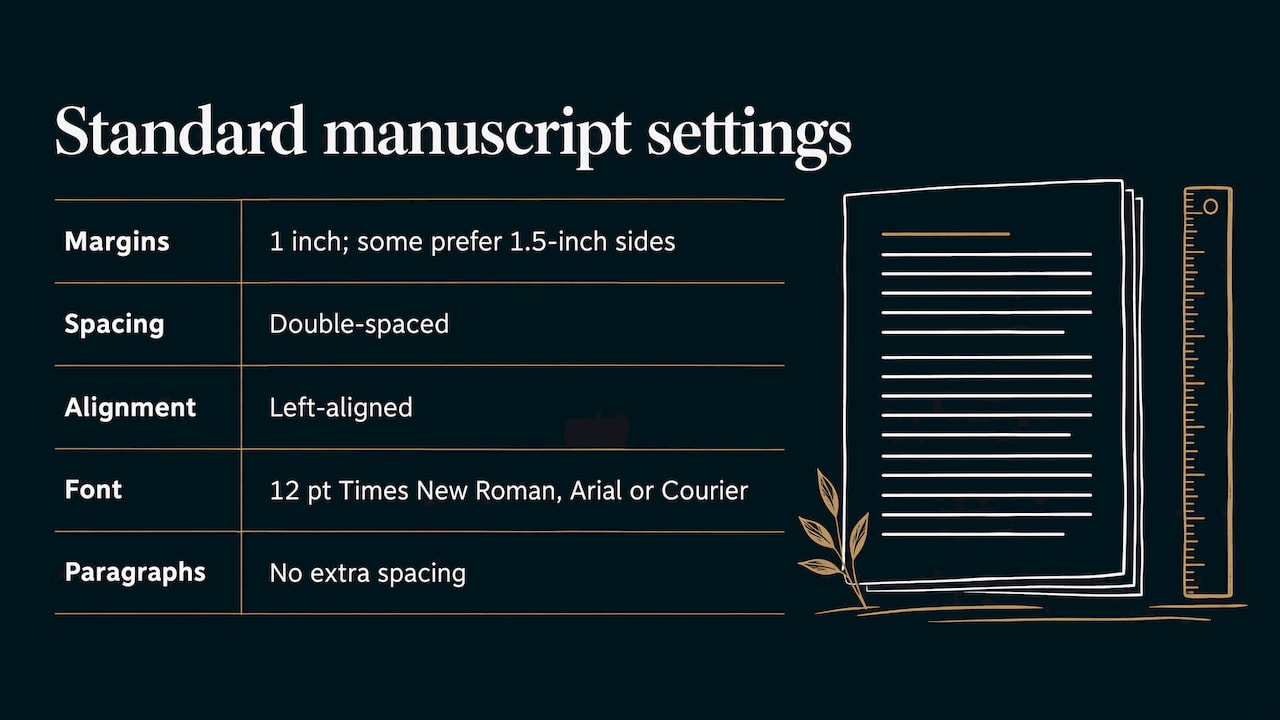
Writer’s Digest recommends 12-point type such as Times New Roman, Arial or Courier for a conventional novel submission, with double spacing and one-inch margins.
Pick one font and use it everywhere, including chapter titles and the title page. Fonts that change size between chapters are one of the small flaws the Authors Guild says can distract readers and make rejection more likely.
Alignment, hyphenation and spaces
CMOS Shop Talk recommends left alignment with a ragged right edge, one space between sentences, and turning off automatic hyphenation in Word. Justified text and auto-hyphenation are book-design habits. In a manuscript they create uneven word spacing and broken words that make editing harder.
One practical rule keeps the file clean: never use the space bar or the Tab key to lay out text. Set the first-line indent in the paragraph settings, so every paragraph has the same indent and an editor can restyle the whole file in one move. Writer’s Digest mentions a five-space indent, which is roughly half an inch.
Paragraphs and scene breaks
Use a first-line indent and no blank line between paragraphs. For a scene break inside a chapter, center a single marker such as # or *** on its own line. Choose one and use it throughout. A blank line alone can disappear when the text moves to a new page, so a visible marker prevents confusion.
Dialogue follows the same rule: each speaker gets a new indented paragraph, with straight or curly quotation marks applied consistently across the file.
Title page
Put the title, your name and your contact details on the first page, with no page number. Zeno Agency, for example, asks for contact details on the title page along with numbered pages, double spacing and legible type of at least 12 points. Writer’s Digest also leaves the title page unnumbered.
If you are entering a contest, read the rules first. The Writer’s Digest Short Short Story Competition says the submission file and filename should not include identifying information, which means the usual title page is not what that entry wants.
Running header and page numbers
CMOS Shop Talk says the running header should carry the author’s surname, a short title and the page number at upper right on every page except the title page. The Saskatchewan Writers’ Guild gives the same pattern: sequential page numbers through the manuscript, excluding the title page, with the surname, title keyword and page number on the pages after the first.
Set this up with the word processor’s header tool and its automatic page-number field. Never type page numbers by hand. In Word, choose a different first page for the title page, so the header starts on the page after it. A short title means one or two key words, such as Bells for a novel called The Drowned Bells.
Chapters
Start each chapter on a new page, using a page break rather than a run of blank lines. Drop the chapter title a third of the way down the page if you like, but keep it in the same font and size as the body text, perhaps in bold. Number or title chapters in one style across the whole file.
When the rules change: follow the submission guidelines
The standard format is what you use when nobody tells you otherwise. The moment a recipient gives instructions, those instructions win. The Authors Guild states that the recipient’s submission guidelines come first.
The differences are real and specific:
-
Madeleine Milburn Literary Agency asks for the manuscript and synopsis in Word format, 1.5- or double-spaced, and says that not following its instructions puts a submission at a disadvantage.
-
Zeno Agency accepts .doc, .docx or PDF, with type of at least 12 points, double spacing, numbered pages and contact details on the title page.
-
Contests may remove identifying details entirely, as the Writer’s Digest example above shows.
Keep one master file in standard format, then make a copy for each submission and adjust only what that recipient asks. That way you never edit your master into a version that suits one agent and breaks for the next. Note that these agents are in the UK, and requirements vary by country and by recipient, so the guidelines you check should be the ones of the person you are actually sending to.
Format first, or write first?
You do not need to fight with margins while drafting. Many writers draft freely and apply the final format once the text is done. What matters is that the underlying structure is clean: real chapter breaks, one paragraph style, no manual spacing. That structure makes the final formatting a ten-minute job.
What takes longer is the consistency work. The Authors Guild’s agent-resource checklist says a novel is not ready if it is unfinished, still a first draft, unread by anyone else, or has not had a final pass for copyediting, consistency, continuity, theme, plot tension and character arcs. A perfectly formatted file with a character whose eye color changes in chapter nine is still not ready.
Keeping the content consistent before you format
This is where fantasy, science fiction and series writers lose the most time. Invented names, ranks, calendars, distances and magic rules all have to match across a hundred thousand words or more. A careful formatter still cannot fix a kingdom that moves across the map between drafts.
The cleanest habit is to keep your reference material in one place and write against it. A story bible holds the facts your manuscript depends on, and our story bible software is built around that idea: characters, kingdoms, maps, family trees and timelines sit in one connected workspace, with linked entries so a change to one item is easy to follow through the rest. If you are still outlining, the free novel outline template gives you a chapter-by-chapter structure to draft into.
Sagalith also has a consistency checking tool, and its integrated manuscript editor means you draft your chapters next to the lore they rely on instead of switching between documents. AI features are always optional, so the words and the decisions remain yours.
Setting up and saving the file
Once the draft is finished and checked, set up the file properly.
-
Name it clearly. An intellectual-property and publishing blog suggests a file name that includes the title, draft stage and date, with older drafts archived separately and a backup saved. For an agent submission, a simple Surname_Title format is easy to find in an inbox, unless the guidelines say otherwise.
-
Apply the format to the whole document. Set styles once: body text, chapter heading, title page. Then update the style rather than selecting text by hand.
-
Set the header and page numbers. Use a different first page so the title page stays clean.
-
Clean up the markup. Before uploading anywhere, remove comments and accept or reject tracked changes according to the recipient’s instructions.
-
Search for stray habits. Look for double spaces after periods, manual line breaks, tabs used as indents and inconsistent quotation marks.
-
Save a backup. Keep your master file and every submission copy.
Exporting your novel manuscript
If you write in a tool rather than a word processor, you export to the format the recipient wants. Word (.docx) is the most commonly requested, as the agent guidelines above show, with PDF accepted by some. Always check which one your recipient names.
The workflow is the same in any tool: finish your draft, export to the requested format, open the exported file in a word processor, and apply or confirm the manuscript settings from the table above. Use the export for the stage you are at:
-
Editing: an editable file such as .docx, so your editor can track changes.
-
Submission: the exact file type in the guidelines.
-
Print or ebook: book design is a separate step, and designers work from your clean text, not from a finished layout.
In Sagalith, exporting your work is always free on every plan, and you can export and back up your entire project at any time. That means your manuscript is never held hostage by a subscription, which matters when a deadline or a submission window arrives.
Check the exact file before you send it
Export and conversion can quietly change a file. A writing-guide site recommends reopening the exact file you intend to send and inspecting the opening pages, chapter transitions, scene breaks, headers and page numbers, plus the final pages, to make sure nothing shifted. Do this every time, even if the last export was fine.
A fast final checklist:
-
Title page present, unnumbered, with correct contact details.
-
Header correct from page two on, with the right surname and short title.
-
Page numbers sequential, with no restarts at chapters.
-
One font, one size, one spacing throughout.
-
Every chapter starts on a new page.
-
Scene breaks visible.
-
No comments, no leftover tracked changes.
-
File type and file name match the guidelines.
The Authors Guild also advises proofreading before you send. Read the first chapter once more on screen, the way the agent will see it.
Where Sagalith fits in your process

Formatting is the last hour of a long project. The long part is keeping a world and a manuscript coherent, and that is what Sagalith is for. It combines your characters, kingdoms, fantasy maps, timelines and family trees with an integrated manuscript editor in one story bible, so you can draft chapters while your lore stays linked and current.
The Wanderer plan is free. Chronicler is $9 per month and Archon is $19 per month, so Wanderer gives you up to 2 worlds and 50 AI credits a month, and the paid plans add unlimited worlds and more monthly AI credits, and every tool is on every plan. You can compare them on the pricing page or look at the full worldbuilding software for novelists, game masters and screenwriters.
If you are earlier in the process, the free writing templates for world, character and outline are a quick way to start organizing before you draft.
FAQ
Is a novel manuscript double-spaced?
Yes, the standard is double spacing, and most guides, including those from the Saskatchewan Writers’ Guild and Writer’s Digest, say so. Some agents accept 1.5 spacing, so check the guidelines of each one you send to.
What font should I use for a manuscript?
Use a standard 12-point font in black. Times New Roman is the most common choice, and Arial and Courier also appear in published guidance. Use one font throughout, including the title page and chapter headings.
Should I format my manuscript like a printed book?
No. Printed pages are typeset with justified, single-spaced text and design choices that come later, during book design. A manuscript stays plain, left-aligned and double-spaced so editors and designers can work from a clean file.
What file type should I send?
Send whatever the recipient names. Word (.docx) is the most commonly requested, and some agents also accept PDF. If no type is given, a Word file is the safest default.
Sources
-
What Are the Guidelines for Formatting a Manuscript?, Writer’s Digest
-
How to Upload a Manuscript for Book Publishing, SelfPublishing.pro
-
Manuscript Format: File, Layout & Guidelines, The Writing Guide