SAGALITH / Worldbuilding tools
Worldbuilding tools that change with your genre
A space opera needs star systems and fleets. A detective novel needs suspects, alibis and red herrings. A haunted-house story needs rules for the thing in the walls. SAGALITH gives each world the tools its genre calls for, and lets you switch the rest on or off.
Every tool included. Free exports on every plan.
Video tour
See the genre lenses in action.
Watch one archive change shape for sci-fi, cyberpunk, mystery and horror: new modules, genre fields, case boards and the dread curve.
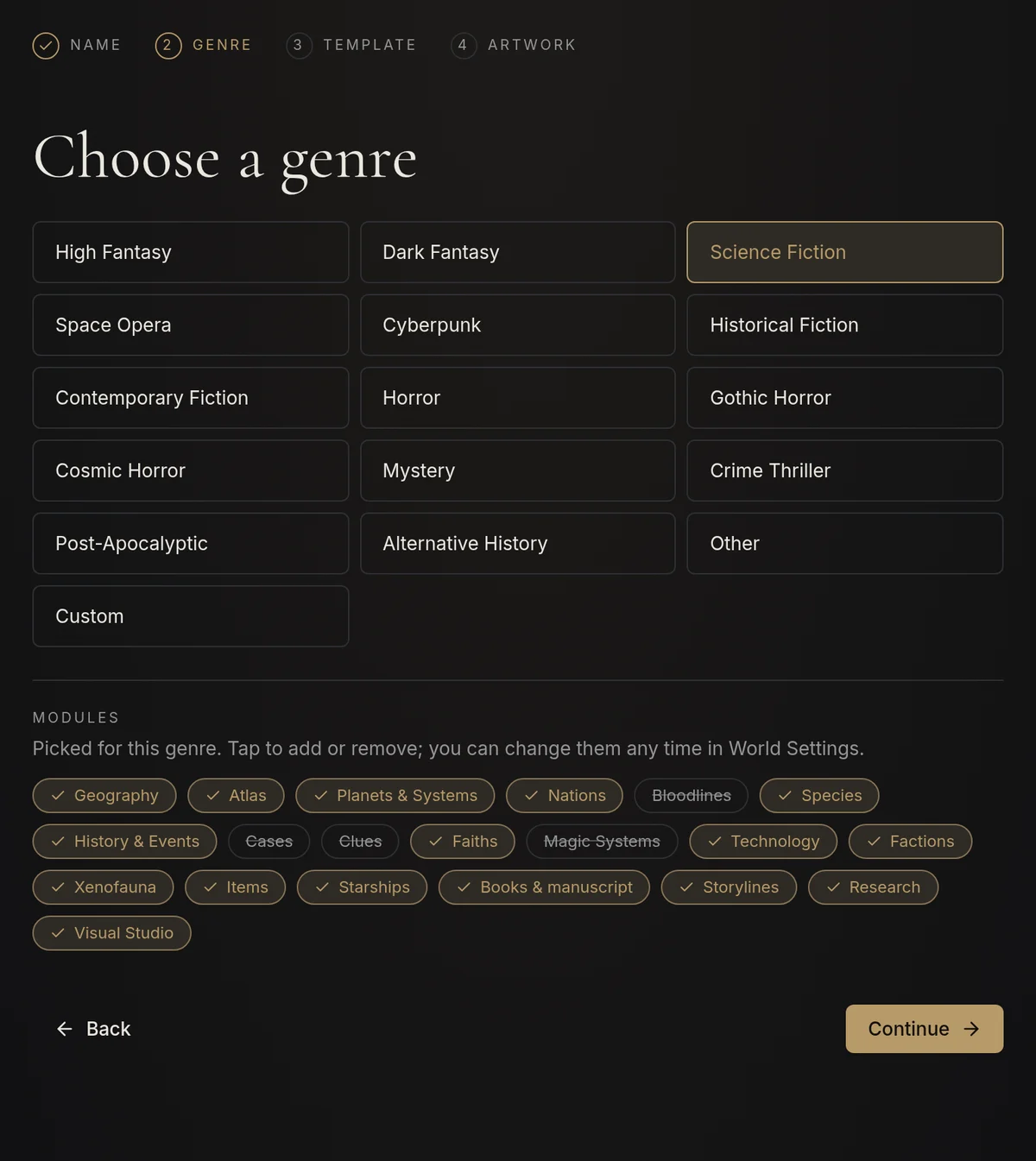
Which worldbuilding tools does your story need?
Most worldbuilding tools are built around fantasy: kingdoms, pantheons, magic systems and a map of a continent. That works well for an epic fantasy and gets in the way of almost everything else. A science fiction writer ends up filing planets under Geography and starships under Items; a crime writer has nowhere to put an alibi.
The tools a setting needs follow from what the story depends on. If the plot turns on a jump drive, you need a place for what the drive can and cannot do. If it turns on a stopped clock at the crime scene, you need a place for what that clue seems to mean, what it really proves and the chapter where the reader understands it.
Choose a genre, get the modules that fit
When you create a world and pick its genre, SAGALITH picks the modules to match. A science fiction world starts with planets, starships and technology; a mystery starts with cases, clues and the crime sequence; a fantasy world keeps houses, magic and religion. Tap any module to add or remove it before you begin, or change the list later in World Settings.
Characters, notes and the Codex of your world's rules are always there. Everything else is a choice, so the menu shows the parts of the world you are actually building.
- Turning a module off only hides it from the menu. The entries stay saved and keep their links.
- Change the genre in World Settings and SAGALITH offers the modules for the new genre. Nothing is deleted.
- Genres also rename what fits: Cultures & Species become Species & Civilizations in science fiction, and Creatures become Entities & Horrors in horror.
Fantasy: houses, magic systems and maps
Fantasy worlds keep the classic toolkit. Bloodlines & Houses draws dynasty trees with heirs and succession laws; Magic & Systems records where power comes from, what it costs and who can use it; Religion & Mythology, Creatures & Bestiary and Items & Artifacts hold the rest. The Atlas pins your places on a map you draw by hand or with AI.
Science fiction: planets, star systems and starships
Planets & Star Systems is a planet builder for your setting: star type, orbital period, length of day, gravity, atmosphere and climate, with habitability running from uninhabitable to garden world or terraformed. Each planet keeps its population, government, biosphere, colonies and exports, so a star system has an economy as well as coordinates.
Starships & Fleets holds each ship's class, registry, shipyard, captain, home port, crew, drive, FTL capability, armament and service history. Technology & Science sets the limits of your science: how a technology works, what it can do, its limitations and side effects, and how mature it is, from theoretical to widespread or lost. Factions gain megacorporations, navies, rebellions and pirate crews; Creatures become Xenofauna.
- Start from the Sci-Fi Universe template: a home system, a star nation, a first ship, its drive and a first contact.
- Space opera worlds get the same modules.
- Mixing in magic for science fantasy is one tap: switch on Magic Systems.
Cyberpunk: megacorps, street gangs and the net
Cyberpunk worlds use the same modules in the language of the genre. Geography becomes City & Districts, with megablocks, arcologies, night markets and safehouses. Starships become Vehicles & Drones, with make and model, plates, hidden compartments and mods. Technology becomes Tech & the Net, where net nodes, ICE and AI constructs live.
Factions list megacorporations, street gangs, fixer networks and the police they own; Items carry cyberware and cyberdecks; Bloodlines become corporate dynasties and crime families. The Cyberpunk City template starts you with a megacity, a district, a corporation, a gang, the net, a neural implant and an AV.
Mystery and crime: cases, clues and alibis
Cases & Investigations holds the central question, the crime scene, the time window, the victim and the suspects, with the official story kept apart from what really happened. Each case page works like a detective board for your novel: the people in the case, the evidence, the crime sequence, the places, the agencies involved and the chapters where the case moves forward, all in one overview.
Clues & Evidence records where each clue was found, who knows about it, what it seems to mean and what it actually proves, whether it is real or a red herring, and the chapters where it is planted, understood and paid off. History becomes Crime Sequence & Alibis, so the night of the crime can be laid out minute by minute. The Detective Mystery template starts with a victim, three suspects and three clues, one of them a red herring.
Horror: rules for the monster and a dread curve
Horror is about limits: what the threat wants, what it cannot do and why nobody can leave. Creatures become Entities & Horrors, and each entity gets a threat file with the signs that it is near, the rules it follows, how anyone survives it and, for you alone, what it really is. Locations become Haunted Sites & Sanctuaries, with a place for why no one can escape.
Every sighting, outbreak and disappearance can be given a dread level from 1 to 5. The threat file draws them as a dread curve and warns you where the fear drops between incidents. Rituals & curses, relics and cursed objects, cults and hunters link to the entity, and the Codex adds horror rules for the supernatural, the cost of fear and the tone. Start from the Gothic & Cosmic Horror template.
Your secrets stay secret
Mysteries and horror stories depend on what the reader does not know yet. Fields such as the culprit, what a clue actually proves or what the entity really is are marked author only. They are never shown on your public wiki or on share cards, so you can publish a world for readers or players without giving away the ending.
The optional AI helpers follow the rules you write in your world's Codex, including the horror rules in a horror world, so a brainstorm does not break the canon you have set. Building and editing entries by hand uses no AI credits.
Your first three steps
- 01
Create a world and choose its genre. The modules are picked for you, and you can tap to change them.
- 02
Start from the template for your genre, such as Sci-Fi Universe, Cyberpunk City, Detective Mystery or Gothic & Cosmic Horror, or begin with a blank world.
- 03
Add the entries your first scene needs and link them; switch modules on in World Settings when the story grows.
Before you begin
Are the genre modules included on the free plan?
Yes. Every module, genre and template is part of the free plan. Only the optional AI helpers use AI credits.
Can I mix genres, such as science fantasy?
Yes. The genre only picks the starting modules. Switch on Magic Systems in a science fiction world, or Planets & Star Systems in a fantasy world, whenever the story needs them.
What happens to my entries if I turn a module off?
Nothing is deleted. The module disappears from the menu, but its entries stay saved, keep their links and come back when you switch the module on again.
What if my genre isn't listed?
Choose the closest genre or write your own. Historical, contemporary and post-apocalyptic worlds start with the standard modules, and you can turn any module on or off.