SAGALITH / Story timeline maker
A story timeline maker for the histories you invent
Put every war, birth, betrayal and chapter of your story on one scaled axis. SAGALITH's timeline reads your world's own calendar, keeps parallel histories apart and shows how old each character is when it happens.
Every tool included. Free exports on every plan.
Video tour
See your story on one timeline.
Watch events, eras and character lifespans line up so dates stay consistent across the whole story.
Why a fiction timeline is different
Most timeline makers are built for project plans, school reports and company histories. They expect real dates, a start this year and a finish next quarter. A story has none of that: its years are counted from a flood or a coronation, its history can begin centuries before the first chapter, and its people age while the plot moves.
SAGALITH's timeline is part of your world archive rather than a separate drawing. Each point on it is a historical event entry with a date, causes, consequences and links to the characters, places and chapters involved, so changing the event changes the timeline everywhere it appears.
Keep the plot consistent
Continuity errors hide in lists. Laid out on one axis, they are easier to see: a messenger who arrives before he was sent, a treaty signed after the war it was meant to end, an heir who is somehow both too young to rule and old enough to command an army.
Give each event a numeric Year to place it on the axis and, if it lasts, an end date to draw it as a bar. Overlapping events stack instead of covering each other, and events you haven't dated yet stay listed below the timeline, so nothing quietly drops out of the history.
- Date the events the plot depends on first; the rest of history can wait.
- Record a duration for sieges, voyages and reigns, not just a start.
- Link each event to the people and places involved, so it shows on their tracks too.
See every character's age at every event
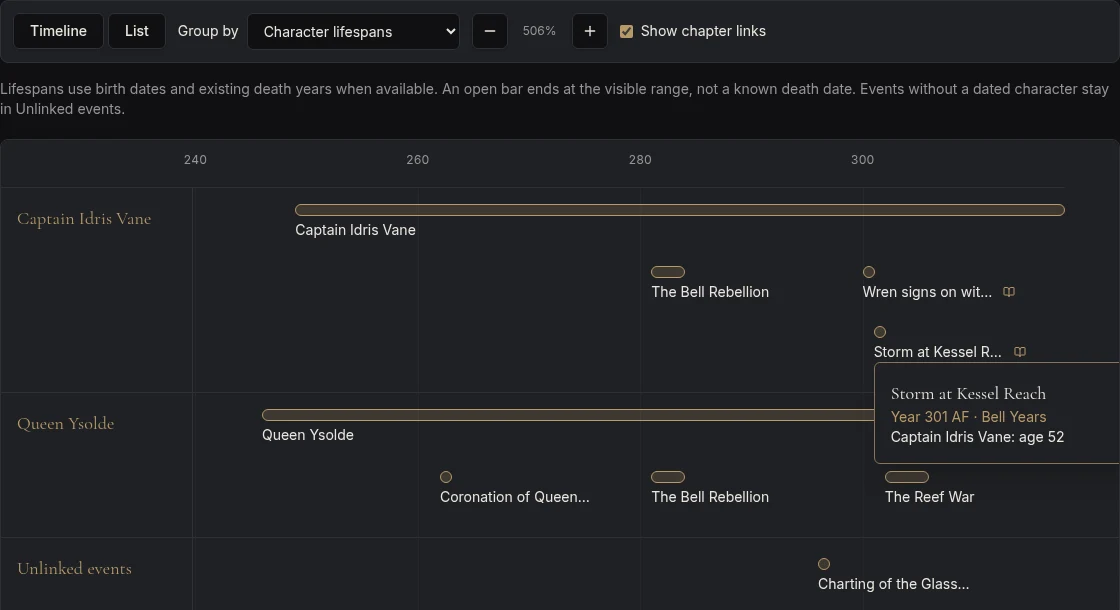
Ages are where long stories break most often. Give a character a date of birth and switch the timeline to character lifespans: each character gets a track with a bar starting in their birth year, and the events linked to them sit on that track. Hover or focus an event to see how old that character was when it happened.
That answers the questions that otherwise mean a calculator and a search through old notes: was the queen sixteen or twenty when she was crowned, and could the mentor really have fought in a war fifty years before the story starts?
Eras, epochs and your own calendar
Write dates the way your world does. The display date can read Year 297 AT or Third Age 1042, while the numeric Year keeps events in order; negative years work for anything before your year zero. Give an event an era and it appears with the date whenever you hover the event or read the list view, so the Age of Salt and the Drowned Century stay part of the picture.
Zoom out to see thousands of years of history at once, or zoom in to follow a single campaign season. The axis rescales to fit the events you have, so a world with a short history and a world with a long one both fill the screen.
A chapter overview beside the history
Link an event to the chapter where it happens and the timeline marks it with a book badge. With chapter links on, you can see at a glance which parts of your history the reader actually meets and which stay in the background.
The list view gives the same events in chronological order for reading straight through. Compare it with your chapter order to check flashbacks, reveals and parallel storylines: the order things happened is rarely the order you tell them in.
Parallel tracks for nations, wars and dynasties
Group the timeline by event kind to see wars, battles, treaties, coronations, discoveries and disasters on their own tracks. Group it by nation, faction or location to follow two kingdoms side by side; an event linked to both sits on both tracks, which is exactly where a border war belongs.
For fantasy worlds with deep history, this is the difference between a list of dates and a sense of how events overlap. Bloodlines & Houses and the connection map show who is related to whom; the timeline shows when it all happened.
Sketch it first with the free planner
Not ready to build a whole world? The free story timeline planner draws up to fifteen events in your browser, works out each character's age at every event and warns you when a date doesn't fit. When the sketch is ready, save it to SAGALITH: the events, the characters and the links between them arrive in your world's timeline.
Your first three steps
- 01
Create a world and add the three or four events your plot depends on, each with a Year.
- 02
Add your main characters with a date of birth and link them to the events they're part of.
- 03
Link events to chapters, then switch between event kinds, places and character lifespans to check the order.
Before you begin
Is the timeline included on the free plan?
Yes. The timeline, its tracks, character lifespans and chapter links are part of every plan and use no AI credits.
Can I use a fantasy calendar or years before zero?
Yes. The display date is free text, so it can follow your own calendar, and the numeric Year used for ordering can be zero or negative.
How is this different from a general timeline maker?
A general timeline maker draws a picture. SAGALITH's timeline is built from the entries in your world, so events stay linked to the characters, places and chapters they involve, and editing an entry updates the timeline.
Can I start in the free planner and move to SAGALITH later?
Yes. Save to SAGALITH turns the planner's events into historical event entries, its characters into character entries with a date of birth, and links each event to the characters in it.